← Proposed workflows

ROLE AUTOMATION STUDY · 5 of 20 companies in our first outreach sample

Purchase invoice, PO & expense matching

Bring invoices, purchase orders and receipt evidence together so the team only investigates mismatches and approvals that need attention.

ILLUSTRATIVE PROPOSAL · NOT A MEASURED CLIENT RESULT

See the work happen on screen.

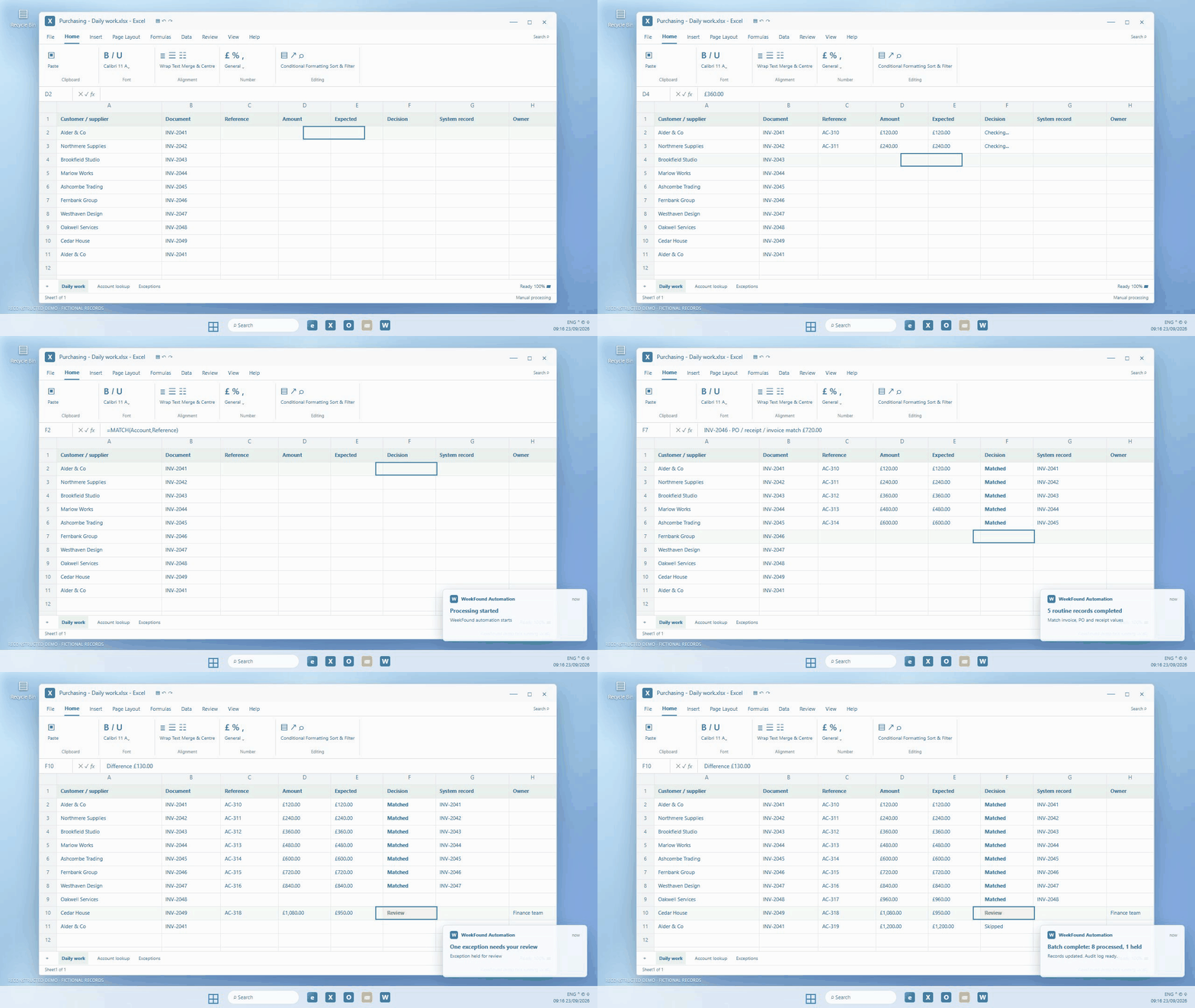
This short GIF reconstructs the manual task and the proposed automation using fictional records. It shows the ordinary items progressing and an exception held for a person. The time saving below is an illustrative target.

Purchase invoice, PO & expense matching: a reconstructed Windows desktop showing routine work processed and an exception held for reviewDownload this GIF ↓

Less rework. More room to move the business forward.

The proposed design would handle repeatable steps, check work before it moves on and give people more capacity for decisions that matter. These benefits would need testing with a real team.

01 / CAPACITY

More time for the work that matters

Routine steps could move forward without repeated manual handling, while people stay involved when judgement is needed. Any time saved would be measured in a pilot.

02 / QUALITY

Fewer avoidable errors

Matching invoice lines to orders and receiving records would catch duplicate bills, incorrect quantities and prices outside the agreed tolerance.

03 / OPPORTUNITY

Time to improve the business and its profitability

Buyers and finance staff could examine supplier performance, negotiate better terms and find avoidable spend instead of chasing paperwork.

BEFORE · MANUAL PROCESS

Every step waits for a person.

  1. Read invoices and expense receipts
  2. Find purchase orders and delivery records
  3. Check quantities, prices and coding
  4. Chase approval and enter the bill
PROPOSED WORKFLOW

Routine work progresses. Exceptions reach the team.

  1. Collect and identify documents
  2. Match against the source records
  3. Route the difference
  4. Post the approved bill

One connected process, from arrival to checked result.

  1. 01

    Collect and identify documents

    Receive supplier invoices and expense receipts, extract line items and link each document to its supplier, order or claimant. Reject duplicates and flag missing evidence.
  2. 02

    Match against the source records

    Compare invoice lines with purchase orders and goods-received records using agreed quantity and price tolerances. Check expenses against documented categories and limits; separate non-PO invoices for their own approval route.
  3. 03

    Route the difference

    Send the buyer or budget owner the exact mismatch, supporting documents and requested decision. Track missing receipts, partial deliveries and approvals without repeated manual chasing.
  4. 04

    Post the approved bill

    Create the accounting entry only after required checks and approvals, save the evidence and reconcile the returned ledger ID. Payment runs and bank-detail changes remain separately controlled.

Work inside the systems the team already uses.

Invoice inbox, purchasing and receiving records, expense platform and accounting ledger. Pleo, Sage and Xero are example connection candidates, subject to the actual systems and access available.

The judgement stays with your people.

Budget owners approve exceptions and expenses requiring judgement. The team checks new suppliers, changed bank details and policy exceptions. No payment is released by this workflow.

Prove the saving before calling it a result.

  1. 01

    Baseline the real work

    Observe at least two representative working weeks, including routine cases and exceptions. Agree the scope, volumes, quality checks and staff minutes before building.
  2. 02

    Connect, then run alongside the team

    Confirm system access, build the intake, rules, exception queue and audit history. Compare proposed actions with human decisions before enabling writes or sending messages.
  3. 03

    Pilot a controlled slice

    Enable only agreed actions, with duplicate protection, alerts and a pause control. Keep a manual fallback and expand only when the quality checks pass.
  4. 04

    Measure the complete cost in time

    Measure match accuracy, duplicate prevention, incorrect approvals, outstanding exceptions and the total time spent by finance and budget owners. Compare a representative post-pilot period with the same scope and workload; report the observed result, including review and correction time.

Could this help your business?

Get in touch and we’ll talk through what you’d like to improve, then explore whether a similar finance automation approach makes sense for you.

Get a free Time-Back Review →