01
Open the account query
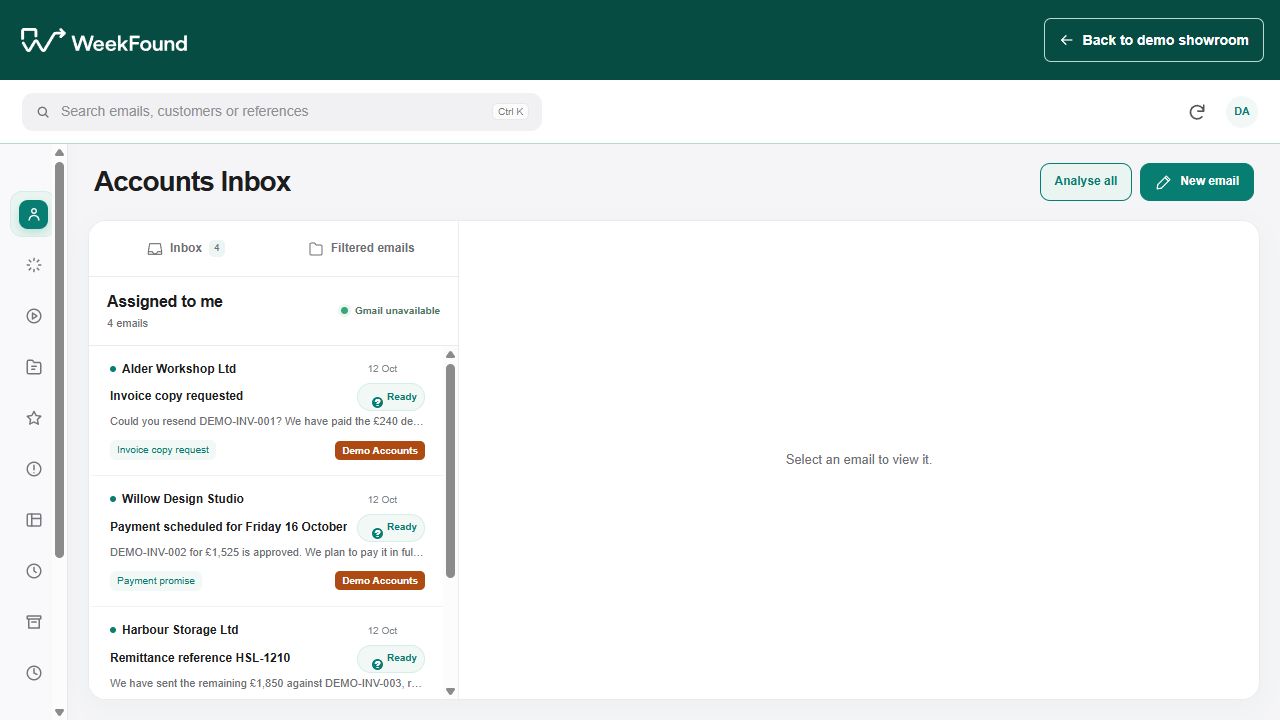
Read the fictional incoming email beside the customer details and prepared context.

Finance inbox and client administration · Showroom demonstration
A short accounts email can lead to several pieces of work: identify the customer, find the invoice, read the previous conversation and decide what response is appropriate. The repeated searching can fill the morning even when the eventual reply is simple.
Who this is for: Accounts teams and shared-inbox owners handling invoice copies, payment messages and routine account queries.
Email management
This demonstration shows the email beside a prepared analysis and proposed action. A person reviews the plan, approves the fictional step and inspects the editable reply. The important part is seeing what the system intends to do before relying on it.
The fictional inbox contains an invoice-copy request for Alder Workshop. The reviewer opens the message, reads the proposed action and expands the full reply details. It can check the recipient and invoice reference before accepting the plan.
The simulated result puts the prepared wording into a reply composer for review. The visitor can edit or copy it, but the showroom does not contact a mailbox, call a live AI service or send the message. Its analysis is prepared in advance to demonstrate the review flow.
From the repeated task to a reviewable result
01
Read the fictional incoming email beside the customer details and prepared context.
02
Expand the action details to review exactly what the draft would say and which request it addresses.
03
Accept only the steps that have been reviewed. The action completes locally using the prepared demonstration.
04
Put the wording into the composer, check the recipient and invoice reference, and edit or copy the draft.
Practical answers
Yes. Start with classification, context gathering and reply preparation, keeping the next action subject to review. This demonstration shows that approval boundary. Any later automatic sending would need specific categories, reliable checks, permissions and a clear way to stop or correct a mistake.
A production design would need verified matching between the sender, customer record, invoice reference and current conversation. Uncertain matches should become a review question. The showroom’s relationships are fictional and prepared; they do not demonstrate live matching against your records.
Record what the customer has promised and the relevant date, then check the authorised payment evidence when the time comes. Do not treat the promise as a cleared payment. Any resulting collection action should use the current account state and agreed business rules.
Yes. The example exposes the proposed steps and complete reply wording before the visitor approves the plan. That is more useful than an approval button with no supporting context: the person needs to understand the recipient, records and intended action.
No. Its analyses and replies are prepared examples, and the action is simulated locally. It demonstrates the workflow and review experience. A live AI-backed version would need a separately scoped model, data access, evaluation and appropriate controls.
That is a failure the production design must explicitly prevent. Check customer identity, recipient permissions and the selected document before any permitted sending step. Run difficult and ambiguous examples during testing, and route uncertainty to a person rather than guessing.
Count the repeated inbox sorting, record searching and drafting work, then include the review and correction time that remains. Also record reopened queries and incorrect actions. Compare that total with the automation cost; do not equate a faster draft with a fully resolved customer request.
Your business and existing tools
Begin with one recurring query the team understands well, such as an invoice-copy request. Our finance inbox study describes a proposed connected workflow separately from the local demo. The finance-assistant review guide explains finance-assistant review points, and services and pricing sets out the current service structure.
WeekFound starts by looking at the repeated work, the time the team spends on it and the mistakes that need correcting. The aim is to give the existing team more capacity as the business grows.
The reviewer checks the recipient, supporting records and proposed wording. Disputes, concessions, ambiguous requests and sensitive decisions need a responsible person.
Measure handling time from the incoming request to a correct resolution, including approval and corrections. Check that the next action addresses the actual query. The prepared example replies are not evidence of live AI accuracy or production savings.
Start with one useful piece of work
Tell us how the task works today, where it gets stuck and what a correct result needs to look like. We can then assess the work, the source data and the review points before agreeing a suitable approach. Essential work should retain a usable manual fallback if an automation or source system changes.
Discuss this workflow